Why OpenText
Why OpenText
OverviewWhy OpenText
OpenText brings decades of expertise to help you unlock data, connect people and processes, and fuel AI with trust
Manage and connect data
Unify data seamlessly across your enterprise to eliminate silos, improve collaboration, and reduce risks
AI-ready information
Get AI-ready and transform your data into structured, accessible, optimized information
Built-in security and compliance
Meet regulatory and compliance requirements and protect your information throughout its lifecycle
Empowering people
OverviewEmpowering people
OpenText helps people manage content, automate work, use AI, and collaborate to boost productivity
Customers
See how thousands of companies around the world are succeeding with innovative solutions from OpenText
Employees
Our people are our greatest asset; they are the life of the OpenText brand and values
Corporate Responsibility
Learn how we aspire to advance societal goals and accelerate positive change
Partners
Find a highly skilled OpenText partner with the right solution to enable digital transformation
Deploy anywhere
OverviewDeployment options
Explore scalable and flexible deployment options for global organizations of any size
Sovereign cloud
Local control. Global scale. Trusted AI
Private cloud
Unlock the value of the cloud while maintaining control and compliance
On-premises
Maintain full control of your data on your own infrastructure
Public cloud
Protect, scale, and use business information in your cloud of choice
AI leadership
OverviewAviator AI
See information in new ways
OpenText™ Aviator™
AI that understands your business, your data, and your goals
OpenText™ Content Aviator™
Power work with AI content management and an intelligent AI content assistant
OpenText™ DevOps Aviator™
Enable faster app delivery, development, and automated software testing
OpenText™ Experience Aviator™
Elevate customer communications and experiences for customer success
OpenText™ Service Management Aviator™
Empower users, service agents, and IT staff to find the answers they need
OpenText™ Trading Grid™ Aviator™
Unlock AI-powered knowledge, insights, and guided action across your supply chain
OpenText™ Aviator™ Studio
A place where you can build, deploy, and iterate on agents in your data's language
Aviator AI
OverviewAviator AI
See information in new ways
OpenText™ Aviator™
AI that understands your business, your data, and your goals
OpenText™ Content Aviator™
Power work with AI content management and an intelligent AI content assistant
OpenText™ DevOps Aviator™
Enable faster app delivery, development, and automated software testing
OpenText™ Experience Aviator™
Elevate customer communications and experiences for customer success
OpenText™ Service Management Aviator™
Empower users, service agents, and IT staff to find the answers they need
OpenText™ Trading Grid™ Aviator™
Unlock AI-powered knowledge, insights, and guided action across your supply chain
OpenText™ Aviator™ Studio
A place where you can build, deploy, and iterate on agents in your data's language
Business Network
OverviewBusiness Network
Connect once, reach anything with a secure B2B integration platform
Content
OverviewContent
Reimagine knowledge with AI-ready content management solutions
OpenText™ Content Aviator™(AI)
Supercharge intelligent workspaces with AI to modernize work
Cybersecurity
OverviewCybersecurity
Integrated cybersecurity solutions for enterprise protection
DevOps
OverviewDevOps
Ship better software—faster—with AI-driven DevOps automation, testing, and quality
Experience and Fax
OverviewExperience and Fax
Reimagine conversations with unforgettable customer experiences
Legal Tech
OverviewLegal Tech
Make smarter decisions with AI-powered legal software and services
Observability and Service Management
OverviewObservability and Service Management
Get the clarity needed to cut the cost and complexity of IT operations
OpenText™ Service Management Aviator™(AI)
Redefine Tier 1 business support functions with self-service capabilities from private generative AI
APIs
OverviewAPIs
Extend the value of your OpenText solutions by building integrations, automation and custom experiences
OpenText™ API Services
Build it your way with OpenText Cloud APIs that create the real-time information flows that enable custom applications and workflows
Device and Data Protection
OverviewDevice and Data Protection
Protect what matters, recover when it counts
Solutions
Trusted Data & AI
OverviewTrusted Data & AI
Secure information management meets trusted AI
OpenText™ Aviator™ Studio
A place where you can build, deploy, and iterate on agents in your data's language
OpenText™ Discovery
A set of tools to help ingest data and automate metadata tagging to fuel AI
OpenText™ Data Compliance
A suite of services and APIs that make governance proactive and persistent
OpenText™ Aviator™ AI Services
Professional services experts who help you on your AI journey
Information Reimagined
OverviewInformation Reimagined
Get greater visibility and sharper insights from AI-driven information management. Ready to see how?
Knowledge reimagined
Transform daily work with enterprise content management powered by AI
Service Management reimagined
Cut the cost and complexity of IT service management, AIOps, and observability
Connections reimagined
AI-powered B2B integration for supply chain success
Conversations reimagined
Drive value, growth, and loyalty with connected customer experiences
Engineering reimagined
Agile development and software delivery? It only seems impossible
Security reimagined
Cybersecurity for the Enterprise
Decisions reimagined
Unlock insights with AI data analytics
Artificial Intelligence
OverviewAviator AI
See information in new ways
OpenText™ Aviator™
AI that understands your business, your data, and your goals
OpenText™ Content Aviator™
Power work with AI content management and an intelligent AI content assistant
OpenText™ DevOps Aviator™
Enable faster app delivery, development, and automated software testing
OpenText™ Experience Aviator™
Elevate customer communications and experiences for customer success
OpenText™ Service Management Aviator™
Empower users, service agents, and IT staff to find the answers they need
OpenText™ Trading Grid™ Aviator™
Unlock AI-powered knowledge, insights, and guided action across your supply chain
OpenText™ Aviator™ Studio
A place where you can build, deploy, and iterate on agents in your data's language
Industry
OverviewIndustry solutions
Improve efficiency, security, and customer satisfaction with OpenText
Energy and resources
Transform energy and resources operations with cloud, cybersecurity, and AI
Financial services
Boost customer experience, compliance, and efficiency with AI
Government
Reimagine your mission with government-secure information management
Healthcare and life sciences
Improve care delivery and patient engagement with AI-powered solutions
Legal
Modernize legal teams with automated, AI-powered legal tech solutions
Manufacturing
Modernize manufacturing operations and logistics to reduce costs and ensure compliance
Retail and consumer goods
Enhance consumer engagement with omnichannel retail solutions and AI
Enterprise Application
OverviewSolutions for Enterprise Applications
Run processes faster and with less risk

Maximize sustained growth, value, and innovation with intelligent enterprise solutions from OpenText and SAP


Optimize Salesforce effectiveness by bringing together transactional data and unstructured content
Services
Services
OverviewServices
Accelerate digital transformation with guidance from certified experts
Professional Services
Modernize your information management with certified experts
Customer Success Services
Meet business goals with expert guidance, managed services, and more
Support Services
Turn support into your strategic advantage
Managed Services
Free up your internal teams with expert IT service management
Learning Services
Discover training options to help users of all skill levels effectively adopt and use OpenText products
Professional Services
OverviewProfessional Services
Modernize your information management with certified experts
Customer Success Services
OverviewCustomer Success Services
Meet business goals with expert guidance, managed services, and more
Support Services
OverviewSupport Services
Turn support into your strategic advantage
Managed Services
OverviewManaged Services
Free up your internal teams with expert IT service management
Learning Services
OverviewLearning Services
Discover training options to help users of all skill levels effectively adopt and use OpenText products
Partners
Find a Partner
OverviewFind a partner
Find a highly skilled OpenText partner with the right solution to enable digital transformation

Cloud Partners
OverviewCloud Partners
OpenText partners with leading cloud infrastructure providers to offer the flexibility to run OpenText solutions anywhere

Optimize performance and reduce costs with applications deployed on a secure, globally scaled platform

Accelerate migration and modernization with deployment in a highly secure and compliant public cloud
Enterprise Application Partners
OverviewEnterprise Application Partners
OpenText partners with top enterprise app providers to unlock unstructured content for better business insights
Maximize sustained growth, value, and innovation with intelligent enterprise solutions from OpenText and SAP
Optimize Salesforce effectiveness by bringing together transactional data and unstructured content
Partner Solutions
OverviewPartner Solutions
Discover flexible and innovative offerings designed to add value to OpenText solutions
Resources for Partners
OverviewResources for Partners
Discover the resources available to support and grow Partner capabilities
Support
OverviewCustomer Support
Get expert product and service support to accelerate issue resolution and keep business flows running efficiently
Resources
OverviewResources
Explore detailed services and consulting presentations, briefs, documentation and other resources
Choose your region:
Europe, Middle East and Africa
Asia–Pacific
OpenText eDiscovery Aviator
What if eDiscovery took days, not months? Build strategy faster.
Video

5 ways to transform eDiscovery and investigations with GenAI
GenAI doesn't just speed up document review. It fundamentally changes how legal teams uncover evidence, assess risk, and build winning case strategies. Here's how OpenText™ eDiscovery Aviator™ empowers you to work smarter, faster, and more strategically.
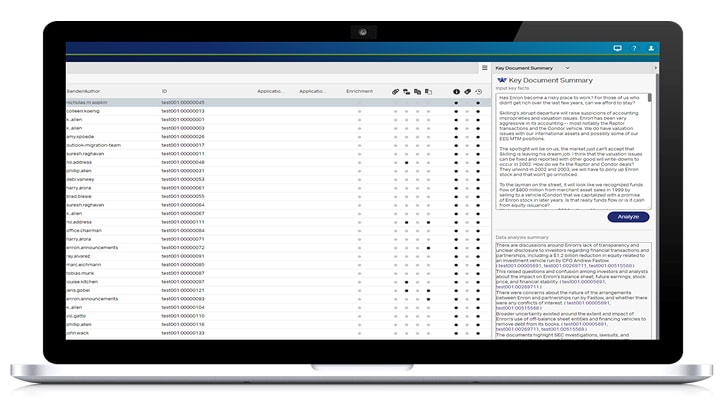
1. Accelerate case strategy
Gain a strategic advantage with AI to identify and summarize key evidence for faster early case assessment (ECA) and strategy formulation.
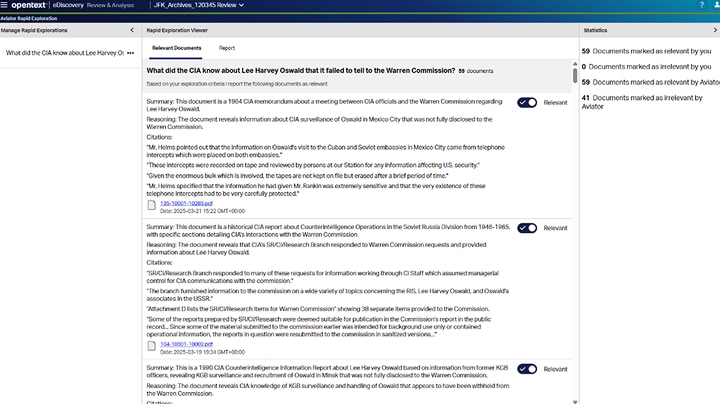
2.Uncover critical evidence
Zero in on key documents and critical issues faster with AI to surface hidden information across massive data sets for proactive, data-driven decisions.
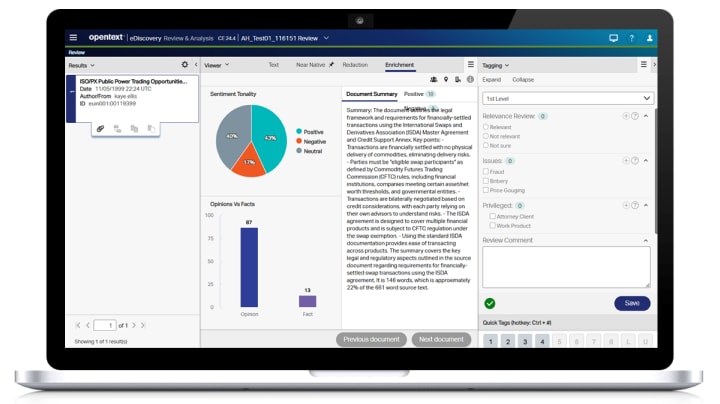
3.Cut through complexity
Transform dense documents into clear, plain-language summaries to accelerate case knowledge and effortlessly share insights with clients and colleagues.
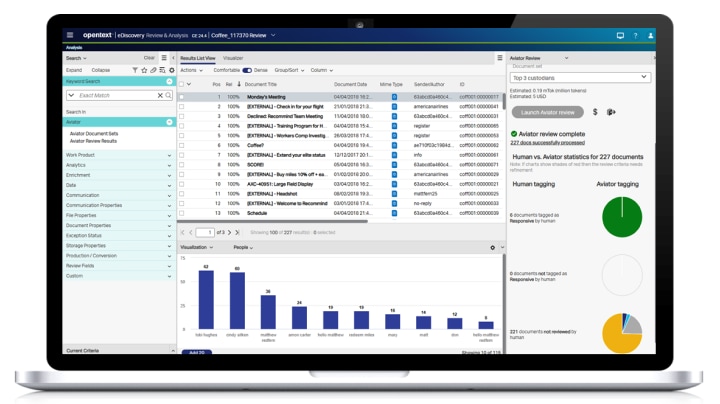
4.Classify documents in minutes
Upload your review memo and let the model rapidly sort responsive from non-responsive documents with built-in testing, sampling, and token estimates.
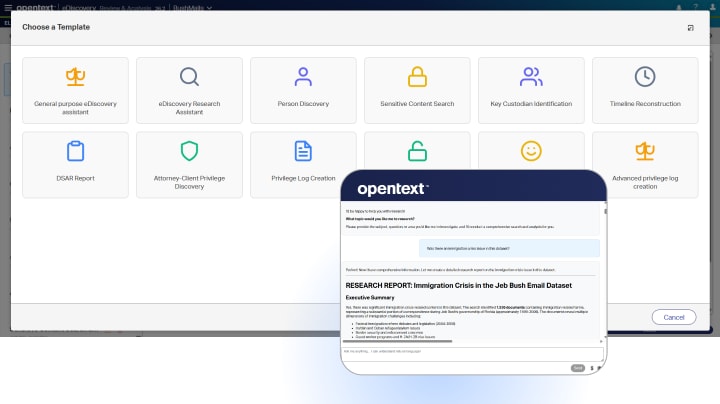
5.Let AI agents do the work
Stop managing tasks across disconnected tools. A built-in AI command center lets you deploy intelligent agents that reveal data insights and create high-value work product in record time.
Winning case strategies built on smarter AI insights
Legal teams using eDiscovery GenAI see real results in speed, cost, and quality.
- 75%
cost savings compared to manual document review
Document review can consume 75%+ of discovery costs. Aviator review delivers the same quality for significantly less. - 88%
faster document review
GenAI automation cuts review time from months or weeks to days or hours—giving you a strategic edge in litigation and investigations. - 90%+
recall with optimized workflows
Exceptional review quality through expert prompt engineering, and proven workflows—built on a decade of OpenText™ leadership in TAR.
How to get started with OpenText eDiscovery Aviator
| Swipe to see more | What to do | Why now | Resources |
|---|---|---|---|
| Step | |||
| Flexible deployment options | Choose eDiscovery Aviator—on-demand, multi-matter subscription, or private cloud options. | Cloud-native Aviator integrates seamlessly into your workflows | View deployment options |
| Explore Aviator capabilities | From key document summary to Aviator review. | Uncover efficiency when and where you need it most. | See the demo |
| Gather case insight | Use Aviator for document summarization or explore data for an investigation or ECA | Start small and build your GenAI confidence | Watch the video |
| Test Aviator review with your data | Submit sample data sets to refine criteria with transparent token estimates | Build confidence in results and understand costs before committing to full-scale review | Find out more |
| Get expert guidance | Engage the OpenText™ Professional Services team for support and best practices | De-risk GenAI adoption with experts in legal workflows and decades of TAR leadership | Jumpstart your GenAI journey |
| Enhance results with managed review services | Combine Aviator with managed review for added savings | Pair GenAI technology with expert prompt engineering for 10–20% additional savings | Explore the offering |
Learn more about OpenText eDiscovery Aviator
OpenText eDiscovery Aviator: What’s new
Read what’s newOpenText eDiscovery
Read the product overviewOpenText eDiscovery
Read the product overview
Technology giant achieved 75% cost savings and 88% faster results with Aviator
Learn more
Bosch leverages Aviator to streamline investigations and cut costs
Learn more
Major housing provider completes AI-driven, 48,756-document review in under two weeks
Learn more
Take a tour of Aviator Review
Watch the demo
See Aviator Review in action
Watch the demoOpenText eDiscovery Aviator agents: Your force multipliers
Watch the webinarUnlocking the Kennedy Archives: Revealing the Hidden Truths Through AI-Powered Workflows
Watch the webinarRapid Exploration with OpenText eDiscovery Aviator
Watch the webinarUnlocking the Kennedy Archives: Revealing the Hidden Truths Through AI-Powered Workflows
Watch the webinarRapid Exploration with OpenText eDiscovery Aviator
Watch the webinar
Putting AI agents to work across eDiscovery use cases
How and when to use OpenText eDiscovery Aviator Agents for your matters.
Read the blog
Why Agentic AI in eDiscovery is strengthening, not replacing, legal judgment
With Agentic AI, human involvement shifts from constant orchestration to strategic oversight.
Read the blog
OpenText eDiscovery Aviator’s Flex: Turn prompts into lasting legal intelligence
With OpenText eDiscovery Aviator's Flex you can choose the question you want Aviator to answer.
Read the blog
What’s new in OpenText eDiscovery
Get the latest updates from OpenText eDiscovery to power faster, smarter analytics.
Read the blog
Navigating the Legal AI tidal wave: Expert insights from OpenText World 2025
Legal leaders at OpenText World 2025 shared five practical ways to use GenAI in eDiscovery.
Read the blog
From data overload to strategic clarity: How AI transforms early case assessment
See how OpenText Aviator Rapid Exploration uses GenAI to deliver instant insight and clarity.
Read the blog
Embedding GenAI in MDR: Jumpstart your litigation practice with GenAI
Learn how you can embed GenAI directly into your outsourced managed document review (MDR).
Read the blogBuilding GenAI foundations: Jumpstart your litigation practice with GenAI
Part 1: Learn how to build generative AI skills for smarter eDiscovery.
Read the blogOpenText eDiscovery Aviator FAQ
OpenText eDiscovery Aviator is a suite of LLM-powered features built into OpenText eDiscovery currently including:
- Key document summary
- Summarization
- Concept label summaries
- Review
- Rapid exploration
- Aviator Agents
Aviator is available to all OpenText eDiscovery cloud customers (single or multi-tenant) in all AWS regions, provided they have signed the appropriate legal paperwork. Contact your OpenText representative to enable OpenText eDiscovery Aviator for your environment.
Yes. OpenText eDiscovery Aviator Agents extend beyond conversational prompting to intelligent search and intelligent automation within the same matter workflow. Users can describe a goal in natural language, and an agent can plan and execute the multi-step search, review, analysis and summarization tasks required to complete it. Through a centralized dashboard, Aviator Agents provides access to pre-configured agentic templates for immediate use and enables teams to build fully custom agents for matter-specific workflows and drive agentic eDiscovery.
Discover how agentic AI transforms eDiscovery workflows.The LLM that powers our Aviator features has multilingual capabilities. Currently, primary testing and validation of the features have been on English-language documents and prompts.
OpenText eDiscovery connects to Amazon Bedrock via the Bedrock API. The interaction of OpenText eDiscovery with the LLM is transactional:
- The OpenText eDiscovery job creates a session with the LLM via the Amazon Bedrock API, directly from the customer's OpenText eDiscovery AWS environment.
- The request is sent to the LLM with the required information (usually the prompt + document text, but depends on the feature).
- The LLM returns the response back to the customer's OpenText eDiscovery AWS environment.
- The session with the LLM is closed and all data is deleted from AWS Bedrock.
Interaction with the LLM is on a project-level and a separate session is created for each LLM feature interaction.
No. Once the session with the LLM is closed, no data from the session remains on the Amazon Bedrock/LLM side. Amazon Bedrock does not store or log customer data in its service logs.
No. Amazon Bedrock performs a deep copy of the LLM and hosts it. The LLM provider (Anthropic) has no read/write access and no internet access to the model within Amazon Bedrock.
OpenText does not train models. Models accessed by OpenText eDiscovery Aviator are pre-trained by the LLM provider. Customer data, input prompts, and outputs are never used to train the LLM model. LLM results are not shared across projects.