為什麼選擇 OpenText
概述 為什麼選擇 OpenText
OpenText 擁有數十年的專業知識,可幫助您釋放資料、連結人員和流程,並以信任推動 AI
管理和連結資料
在您的企業中無縫統一資料,消除孤島、改善協作並降低風險
具備 AI 的資訊
做好 AI 準備,並將您的資料轉化為結構化、可存取且優化的資訊
內建的安全性與合規性
滿足法規和合規要求,並讓資訊在整個生命週期中受到保護
AI 領導力
概述 Aviator AI
以全新的方式查看資訊
OpenText™ Aviator™ AI
AI 了解您的企業、您的資料與您的目標
OpenText™ MyAviator
迎向更快速的決策。您的安全個人 AI 助理已經準備好開始工作
OpenText™ Business Network Aviator™
利用供應鏈的相關生成式 AI 獲得更深入的見解
OpenText™ Content Aviator™
利用 AI 內容管理和智能 AI 內容助手提升工作效率
OpenText™ Cybersecurity Aviator™
利用 AI 網路安全和敏捷威脅偵測來改善您的安全態勢
OpenText™ DevOps Aviator™
加快應用程式的交付、開發和自動化軟體測試
OpenText™ Experience Aviator™
提升客戶溝通與體驗,促進客戶成功
OpenText™ Fax Aviator™
使用 AI 將每一份傳真瞬間轉化為行動
OpenText™ Service Management Aviator™
賦能使用者、服務代理和 IT 人員,讓他們找到所需的答案
Aviator AI
概述 Aviator AI
以全新的方式查看資訊
OpenText™ Aviator™ AI
AI 了解您的企業、您的資料與您的目標
OpenText™ MyAviator
迎向更快速的決策。您的安全個人 AI 助理已經準備好開始工作
OpenText™ Business Network Aviator™
利用供應鏈的相關生成式 AI 獲得更深入的見解
OpenText™ Content Aviator™
利用 AI 內容管理和智能 AI 內容助手提升工作效率
OpenText™ Cybersecurity Aviator™
利用 AI 網路安全和敏捷威脅偵測來改善您的安全態勢
OpenText™ DevOps Aviator™
加快應用程式的交付、開發和自動化軟體測試
OpenText™ Experience Aviator™
提升客戶溝通與體驗,促進客戶成功
OpenText™ Fax Aviator™
使用 AI 將每一份傳真瞬間轉化為行動
OpenText™ Service Management Aviator™
賦能使用者、服務代理和 IT 人員,讓他們找到所需的答案
商業網路
概述 Business Network
只需連結一次,即可透過安全的 B2B 整合平台觸及任何目標
OpenText™ Business Network Aviator™(AI)
徹底革新雲端網路的連結性
網路安全
概述 Cybersecurity
企業保護的整合網路安全解決方案
OpenText Cybersecurity for SMBs & MSPs
資料保護用途和安全解決方案
OpenText™ Cybersecurity Aviator™(AI)
利用敏捷 AI 的力量,重新定義威脅狩獵以提升安全防禦能力
DevOps
概述 DevOps
利用 AI 驅動的 DevOps 自動化、測試和品質,更快速交付更優質的軟體
Experience and Fax
概述 Experience and Fax
以難忘的客戶體驗重新構思對話
OpenText™ Experience Aviator™(AI)
使用私人生成的 AI 改變客戶溝通
OpenText™ Fax Aviator™(AI)
利用 AI 將傳真轉化為適合工作流程的資料
法律科技
概述 Legal Tech
利用人工智能驅動的法律軟體和服務做出更聰明的決策
OpenText™ eDiscovery
以 AI 的速度與精確度加速電子證據收集
OpenText™ Investigation
利用早期案件評估和調查工具,以最佳化策略
OpenText™ Core Insight
利用進階的 TAR 和自動化文件審查,提升 eDiscovery 的智慧化程度
OpenText™ Core Legal Hold
自動化法律保留,以減少高風險且耗時的流程
OpenText™ Legal Knowledge Management
打破內容孤島,獲取知識和法律見解
可觀察性與服務管理
概述 Observability and Service Management
獲得所需的清晰度,以降低 IT 營運的成本和複雜性
OpenText™ Service Management Aviator™(AI)
重新定義第 1 層商業支援功能,利用私人生成式 AI 的自助服務能力
API
概述 APIs
使用經過驗證的 OpenText 資訊管理技術建立自訂應用程式
OpenText™ API Services
使用 OpenText Cloud API 按照您的方式構建,創建支持自訂應用程式和工作流程的即時資訊流
Device and Data Protection
概述 Device and Data Protection
保護重要的事物,在關鍵時刻復原
統一端點管理工具
- OpenText™ Endpoint Management
- OpenText™ ZENworks Suite
- OpenText™ ZENworks Service Desk
- OpenText™ ZENworks Configuration Management
- OpenText™ ZENworks Endpoint Security Management
- OpenText™ ZENworks Full Disk Encryption
- OpenText™ ZENworks Endpoint Software Patch Management
- OpenText™ ZENworks Asset Management
可信資料與 AI
概述 可信資料與 AI
安全資訊管理與可信賴的 AI 相遇
OpenText™ AI Data Platform
一個統一的資料架構,可提升資料和 AI 的可信度
OpenText™ Aviator™ Studio
一個可以使用資料語言建置、部署和迭代代理程式的地方
OpenText Discovery
一套用於幫助擷取資料和自動添加元資料標記的工具,以推動 AI 發展
OpenText Data Compliance
一套服務和 API,使治理變得主動且持久
OpenText Aviator AI Services
專業服務專家協助您踏上 AI 旅程
人工智能
概述 Aviator AI
以全新的方式查看資訊
OpenText™ Aviator™ AI
AI 了解您的企業、您的資料與您的目標
OpenText™ MyAviator
迎向更快速的決策。您的安全個人 AI 助理已經準備好開始工作
OpenText™ Business Network Aviator™
利用供應鏈的相關生成式 AI 獲得更深入的見解
OpenText™ Content Aviator™
利用 AI 內容管理和智能 AI 內容助手提升工作效率
OpenText™ Cybersecurity Aviator™
利用 AI 網路安全和敏捷威脅偵測來改善您的安全態勢
OpenText™ DevOps Aviator™
加快應用程式的交付、開發和自動化軟體測試
OpenText™ Experience Aviator™
提升客戶溝通與體驗,促進客戶成功
OpenText™ Fax Aviator™
使用 AI 將每一份傳真瞬間轉化為行動
OpenText™ Service Management Aviator™
賦能使用者、服務代理和 IT 人員,讓他們找到所需的答案






OpenText ZENworks Configuration Management
透過統一端點管理簡化行動裝置管理
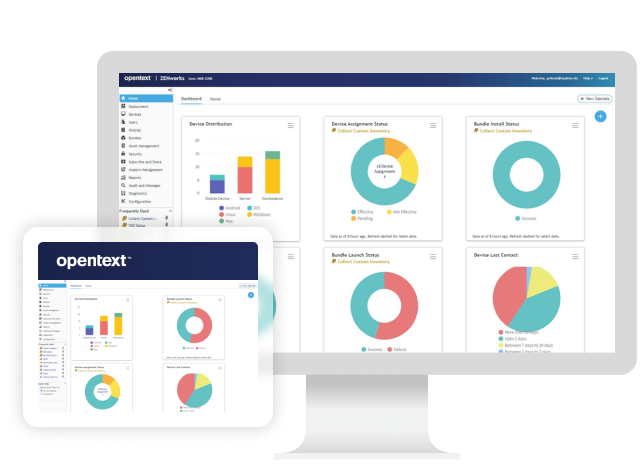
隨時隨地管理各端點的持續變化閱讀《Omdia 報告》
概述

透過 OpenText™ ZENworks Configuration Management 管理裝置與軟體,掌控您的混合端點環境。OpenText ZENworks Configuration Management 無縫結合 PC 用戶端與行動裝置管理的優勢,透過單一網頁管理控制台,為企業與自帶裝置提供卓越的控制。透過確保每台設備均符合規範,提升安全性、速度與效率。
OpenText ZENworks Configuration Management 能為您做些什麼?

批量分發軟體以便於更新
分發並追蹤軟體更新,支援常見的批量授權與應用程式發佈部署,例如 Apple™ VPP™ 和 Android™ Enterprise Play for Work™。

快速地將資源傳送到終端設備
為裝置利用 Apple DEP™、Android Enterprise™ 和 Microsoft Autopilot™。與 Microsoft Deployment Toolkit™、AutoYaST™ 和 KickStart™ 整合。

遠端管理設備
透過整合且可記錄的遠端管理,在企業網路內外控制、檢視、聊天、傳輸檔案及執行應用程式。

強化行動裝置安全
透過統一的身份基礎整合管理所有 iOS™、Android™、ActiveSync™、Windows™、MacOS™ 和 Linux™ 端點裝置,提升行動安全性。
ZENworks 可讓我們瞭解每台機器和行動裝置上的執行內容,並可集中部署設定變更或修補程式版本。
為什麼選擇 OpenText ZENworks 配置管理?
-
所有設備的統一管理
從一個控制台管理所有行動裝置、桌上型電腦和筆記型電腦,降低複雜性並提升對所有平台(包括 iOS、Android 和 Windows)的控制。
-
透過行動控制增強安全性
透過控制密碼、加密和應用程式限制的政策,強化行動安全。遠端鎖定或清除遺失的裝置,以確保資料保護。
-
具成本效益的端點管理
透過相同的平台管理所有裝置,無需新的授權、系統或額外的行動管理 IT 訓練,從而避免額外支出。
主要功能
使用 OpenText ZENworks 配置管理,從同一主控台、以相同方式和相同基礎架構管理所有行動裝置、筆記型電腦和桌上型電腦。
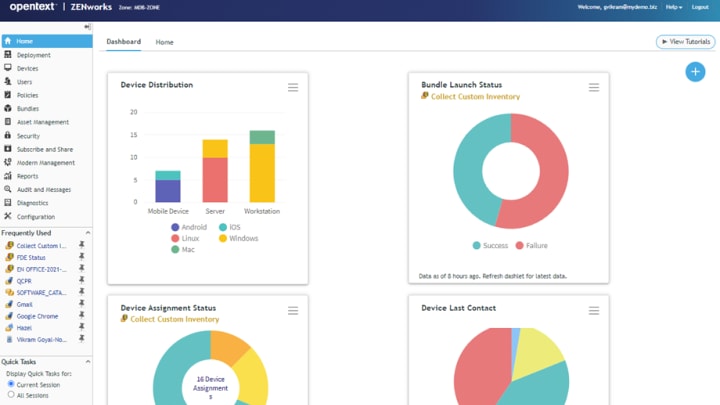
硬體和軟體清單
發現 IP 附加資產,以建立完整的端點裝置硬體與軟體清單。
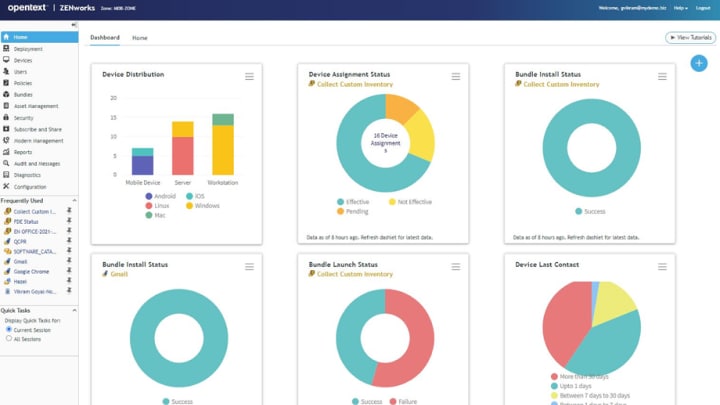
現代設備管理
為 Windows、iOS 和 Android 裝置實施現代化裝置管理功能。
遠端工作支援
使員工能夠輕鬆管理混合型工作團隊,無需 VPN 連線即可支援端點裝置。
行動安全政策執行
透過行動安全政策強制執行密碼限制、密碼複雜性、加密設定、螢幕鎖定,以及裝置不活動設定。
遠端端點鎖定
遠端鎖定遺失或被竊的裝置,並允許使用者輸入其設定的密碼來解鎖裝置。
簡化行動應用程式的分發與控制
讓員工能夠為不同的行動裝置用戶及群組配置 iOS™ 應用程式、Android Enterprise™ 應用程式及 iOS™ 設定檔。
加速發揮 OpenText ZENworks Configuration Management 的價值
整合
OpenText ZENworks Configuration Management 與以下系統整合:
- 管理、保全及保護使用者資料與端點裝置統一端點管理工具
- 使用快速、簡便的自助式 ITIL 服務台解決方案來簡化 ITOpenText™ ZENworks Service Desk
- 透過集中控制簡化端點安全性與管理OpenText™ ZENworks Endpoint Security Management
- 加密 Microsoft Windows™ 終端設備上的靜態數據OpenText™ ZENworks Full Disk Encryption
- 透過自動化 Windows 補丁管理提升安全性OpenText™ ZENworks Endpoint Software Patch Management
- 隨時掌握您所有的授權需求OpenText™ ZENworks Asset Management
專業服務
OpenText 專業服務將端到端解決方案的實施與全面的技術服務相結合,以幫助改善系統。
- 尋找一位值得信賴的夥伴來引導您的資訊管理之路您的成功之旅
- 利用現代解決方案,推動您的業務邁向未來。NextGen 服務
- 加速您的資訊管理之旅諮詢服務
- 發揮資訊管理解決方案的全部潛力客戶成功服務
合作夥伴
OpenText 協助客戶找到合適的解決方案、適當的支援和適當的結果。
- 搜尋 OpenText 的合作夥伴目錄尋找夥伴
- 業界領先的組織,致力於提升 OpenText 產品與解決方案策略合作夥伴
- 探索 OpenText 的合作夥伴解決方案目錄應用程式市集
訓練
OpenText學習服務提供全面的賦能和學習計劃,加速知識和技能的提升。
- 滿足所有類型使用者的需求,以促進有效採用。學習服務
- 無限次使用個人化等級的訓練,滿足您的需求學習訂閱
- 在需要時獲取專業知識彈性學分